
Binance -4061, Order's position side does not match user's setting., means the positionSide on your USDⓈ-M futures order doesn’t fit the account’s Position Mode. A Hedge Mode account needs LONG or SHORT on every order. By contrast, a One-way Mode account accepts only BOTH or no positionSide at all. The error usually appears the day someone flips the mode in the Binance app and a bot that was written for the other mode carries on sending orders.
This note shows how to read the mode, build orders that are correct in either mode, and switch mode safely with the open-source binance package for Node.js and TypeScript (the Binance JavaScript SDK we maintain at Siebly). Every snippet was type-checked with tsc --strict against binance 3.6.13 on 25 November 2026.
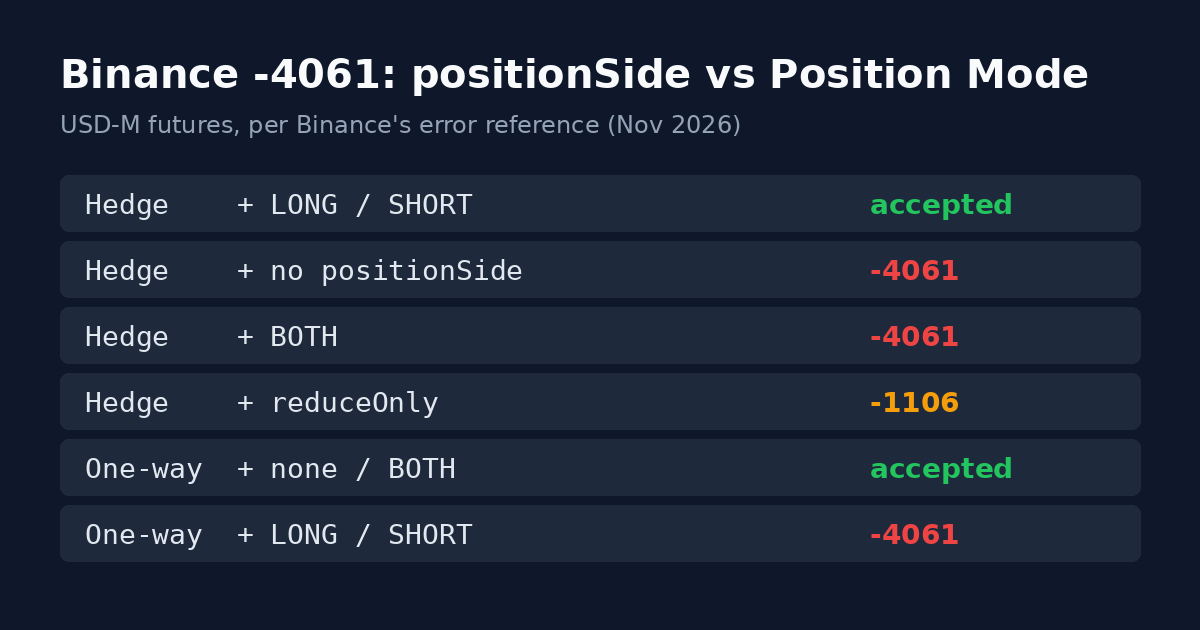
The three cases behind Binance -4061
| Account mode | Order sends | Result |
|---|---|---|
| Hedge Mode | no positionSide |
-4061 (a missing value is treated as BOTH) |
| Hedge Mode | positionSide: 'BOTH' |
-4061 |
| One-way Mode | positionSide: 'LONG' or 'SHORT' |
-4061 |
| Hedge Mode | positionSide plus reduceOnly: 'true' |
-1106 Parameter 'reduceOnly' sent when not required. |
Position Mode is an account-wide setting, not a per-symbol one: the endpoint behind setPositionMode takes a single dualSidePosition flag and no symbol. Also, any other tool holding a futures-enabled key can change it too, so a bot shouldn’t assume the mode it saw at start-up is still true an hour later.
Read the Position Mode with the SDK
getCurrentPositionMode() calls GET /fapi/v1/positionSide/dual and returns { dualSidePosition } as a boolean: true is Hedge Mode, false is One-way Mode.
import { USDMClient } from 'binance';

const client = new USDMClient({
  api_key: process.env.BINANCE_API_KEY,
  api_secret: process.env.BINANCE_API_SECRET,
  testnet: process.env.BINANCE_TESTNET === 'true',
});

export async function isHedgeMode(): Promise<boolean> {
  const { dualSidePosition } = await client.getCurrentPositionMode();
  return dualSidePosition; // true = Hedge Mode, false = One-way Mode
}
One trap: the read returns a boolean, but the write takes a string. For example, setPositionMode({ dualSidePosition: 'true' }) is what the typings accept, because Binance expects the literal text "true" or "false" in the request.
Build orders that work in either mode
Describe what the order should do (open or close, long or short) and let one function turn that into Binance parameters. In Hedge Mode the leg goes in positionSide, and closing a long is a SELL on the LONG leg. In contrast, One-way Mode has no leg, so a close is a plain opposite-side order with reduceOnly to stop it flipping the position.
import { NewFuturesOrderParams, OrderSide, PositionSide } from 'binance';

type Intent = 'open-long' | 'close-long' | 'open-short' | 'close-short';

function sideFor(intent: Intent): OrderSide {
  return intent === 'open-long' || intent === 'close-short' ? 'BUY' : 'SELL';
}

export function buildOrder(
  symbol: string,
  intent: Intent,
  quantity: number,
  hedgeMode: boolean,
): NewFuturesOrderParams {
  const order: NewFuturesOrderParams = {
    symbol,
    side: sideFor(intent),
    type: 'MARKET',
    quantity,
  };

  if (hedgeMode) {
    // Hedge Mode: every order names the leg. No reduceOnly here.
    const leg: PositionSide = intent.endsWith('long') ? 'LONG' : 'SHORT';
    order.positionSide = leg;
  } else if (intent.startsWith('close')) {
    // One-way Mode: no positionSide; reduceOnly stops a flip.
    order.reduceOnly = 'true';
  }

  return order;
}
However, in Hedge Mode, a SELL on the LONG leg can only reduce that long, so reduceOnly isn’t needed and Binance rejects it with -1106. Then keep the close quantity at or below the position size, which you can read from getPositionsV3() (one row per leg, with positionSide and a signed positionAmt).
Catching Binance -4061 from the SDK error
When Binance answers with an error, binance throws an object with Binance’s numeric code, the message, and the raw body. A dummy key against getCurrentPositionMode(), for example, throws { code: -2015, message: 'Invalid API-key, IP, or permissions for action', body: { code: -2015, msg: '...' } }. That also makes -4061 easy to single out: read the mode again and retry once, but only if the mode really changed.
interface BinanceApiError {
  code?: number;
  message?: string;
  body?: unknown;
}

export function binanceCode(e: unknown): number | undefined {
  if (typeof e === 'object' && e !== null && 'code' in e) {
    const code = (e as BinanceApiError).code;
    return typeof code === 'number' ? code : undefined;
  }
  return undefined;
}

export async function placeWithModeCheck(symbol: string, intent: Intent, quantity: number) {
  let hedge = await isHedgeMode();
  try {
    return await client.submitNewOrder(buildOrder(symbol, intent, quantity, hedge));
  } catch (e) {
    if (binanceCode(e) !== -4061) throw e;
    // The mode changed under us: read it again and retry once.
    const fresh = await isHedgeMode();
    if (fresh === hedge) throw e;
    hedge = fresh;
    return client.submitNewOrder(buildOrder(symbol, intent, quantity, hedge));
  }
}
If the mode didn’t change, the bug is in the order itself (often a hard-coded positionSide), and retrying would only repeat the error, so the function rethrows.
Switch the mode without -4059, -4067 or -4068
Binance refuses a mode change while anything is open. The three codes you’ll see:
-4059No need to change position side.The account is already in that mode.-4067Position side cannot be changed if there exists open orders.-4068Position side cannot be changed if there exists position.
Check first, then switch. Conditional orders (stops and take-profits) now live in Binance’s Algo Service, so count them with getOpenAlgoOrders() as well as getAllOpenOrders():
export async function setHedgeMode(wanted: boolean): Promise<void> {
  if ((await isHedgeMode()) === wanted) return; // avoids -4059

  const openOrders = await client.getAllOpenOrders();
  const openAlgo = await client.getOpenAlgoOrders();
  const positions = (await client.getPositionsV3()).filter(
    (p) => Number(p.positionAmt) !== 0,
  );

  if (openOrders.length || openAlgo.length || positions.length) {
    throw new Error(
      `Cannot switch: ${openOrders.length} open orders, ${openAlgo.length} open algo orders, ${positions.length} positions`,
    );
  }

  try {
    await client.setPositionMode({ dualSidePosition: wanted ? 'true' : 'false' });
  } catch (e) {
    const code = binanceCode(e);
    if (code === -4059) return; // already in that mode
    if (code === -4067 || code === -4068) {
      throw new Error(`Position mode blocked by open orders or positions (code ${code})`);
    }
    throw e;
  }
}
However, the function only reports what blocks the switch. Closing positions or cancelling orders is a trading decision, so leave that to a person or to explicit logic of your own.
Stops and take-profits need the leg too
The Hedge Mode rule applies to conditional orders as well, and this is where many bots that fixed their entry orders still hit -4061. With submitNewAlgoOrder, pass the same leg:
import { FuturesNewAlgoOrderParams } from 'binance';

export function stopLossFor(
  symbol: string,
  leg: 'LONG' | 'SHORT',
  triggerPrice: string,
  hedgeMode: boolean,
): FuturesNewAlgoOrderParams {
  const order: FuturesNewAlgoOrderParams = {
    algoType: 'CONDITIONAL',
    symbol,
    side: leg === 'LONG' ? 'SELL' : 'BUY',
    type: 'STOP_MARKET',
    triggerPrice,
    closePosition: 'true',
  };
  if (hedgeMode) order.positionSide = leg;
  return order;
}

// await client.submitNewAlgoOrder(stopLossFor('BTCUSDT', 'LONG', '55000', hedge));
Binance -4061 checklist
- Read the mode with
getCurrentPositionMode()at start-up and after any -4061. - Hedge Mode: send
positionSide: 'LONG'or'SHORT'on every order, including stops and take-profits, and neverreduceOnly. - One-way Mode: omit
positionSide(or send'BOTH') and usereduceOnly: 'true'on closes. - Switch mode only when
getAllOpenOrders(),getOpenAlgoOrders()andgetPositionsV3()are all empty; treat -4059 as “already done”. - Try changes on the futures testnet first (
testnet: truein the client options). - Give the bot’s key only the permissions it needs (no withdrawals) and restrict it to your server’s IP. More in our API key security guide.